EstateMate Developer Guide
Acknowledgements
- The
toDisplayValuemethod in theLeaseAmountclass was adapted from this StackOverflow answer to format currency using commas for every thousand digit.
Setting up, getting started
Refer to the guide Setting up and getting started.
Design
Architecture
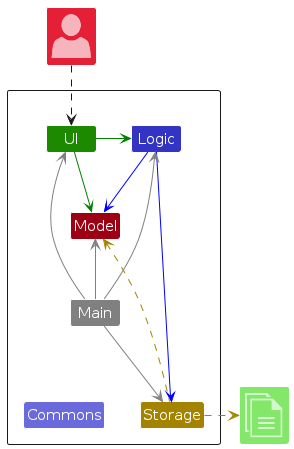
The Architecture Diagram given above explains the high-level design of the App.
Given below is a quick overview of main components and how they interact with each other.
Main components of the architecture
Main (consisting of classes Main and MainApp) is in
charge of the app launch and shut down.
- At app launch, it initializes the other components in the correct sequence, and connects them up with each other.
- At shut down, it shuts down the other components and invokes cleanup methods where necessary.
The bulk of the app's work is done by the following four components:
UI: The UI of the App.Logic: The command executor.Model: Holds the data of the App in memory.Storage: Reads data from, and writes data to, the hard disk.
Commons represents a collection of classes used by multiple other components.
How the architecture components interact with each other
The Sequence Diagram below shows how the components interact with each other for the scenario where the user issues
the command delete 1.
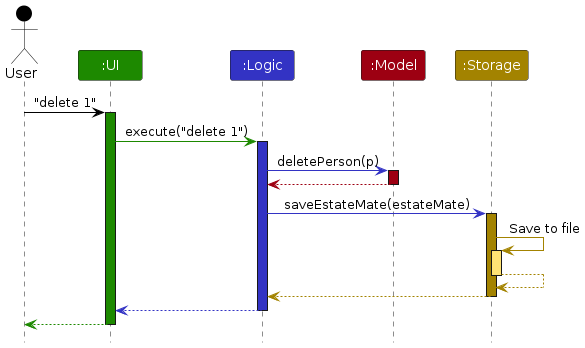
Each of the four main components (also shown in the diagram above),
- defines its API in an
interfacewith the same name as the Component. - implements its functionality using a concrete
{Component Name}Managerclass (which follows the corresponding APIinterfacementioned in the previous point.
For example, the Logic component defines its API in the Logic.java interface and implements its functionality using
the LogicManager.java class which follows the Logic interface. Other components interact with a given component
through its interface rather than the concrete class (reason: to prevent outside component's being coupled to the
implementation of a component), as illustrated in the (partial) class diagram below.
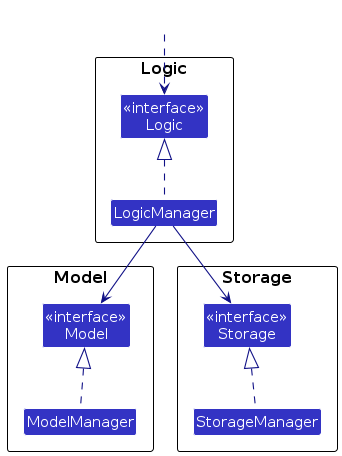
The sections below give more details of each component.
UI component
The API of this component is specified in Ui.java
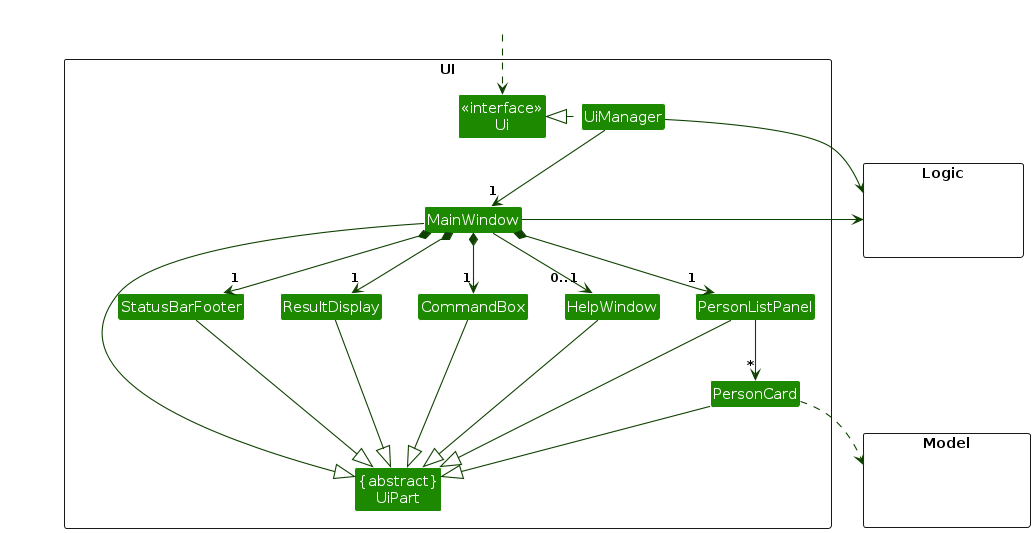
The UI consists of a MainWindow that is made up of parts e.g.CommandBox, ResultDisplay, TenantListPanel,
StatusBarFooter etc. All these, including the MainWindow, inherit from the abstract UiPart class which captures
the commonalities between classes that represent parts of the visible GUI.
The UI component uses the JavaFx UI framework. The layout of these UI parts are defined in matching .fxml files that
are in the src/main/resources/view folder. For example, the layout of the MainWindow
is specified in MainWindow.fxml
The UI component,
- executes user commands using the
Logiccomponent. - listens for changes to
Modeldata so that the UI can be updated with the modified data. - keeps a reference to the
Logiccomponent, because theUIrelies on theLogicto execute commands. - depends on some classes in the
Modelcomponent, as it displaysPersonobject residing in theModel.
Note:
MainWindowstores a reference to aModelinterface instance. This is to pass theModelinstance toTenantListPanelas well as to retrieve job information forJobListPanel.TenantCardhas a stronger association with theModelcomponent because it stores a reference to aModelinterface instance. However, this is used only to retrieve and display jobs linked to a tenant.
Logic component
API : Logic.java
Here's a (partial) class diagram of the Logic component:
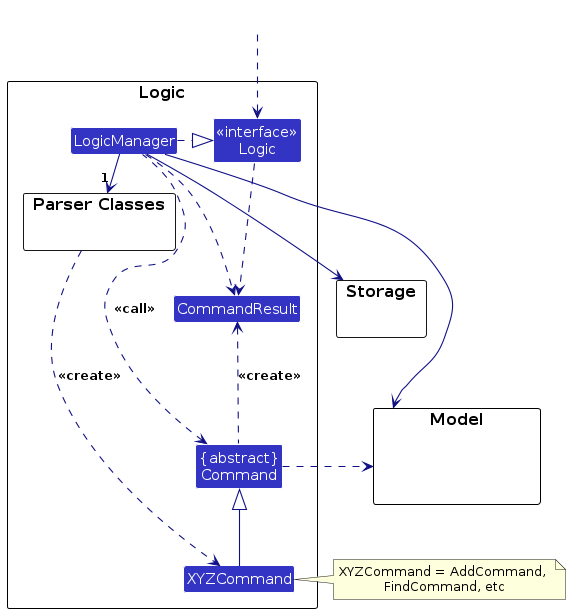
The sequence diagram below illustrates the interactions within the Logic component, taking execute("delete 1") API
call as an example.
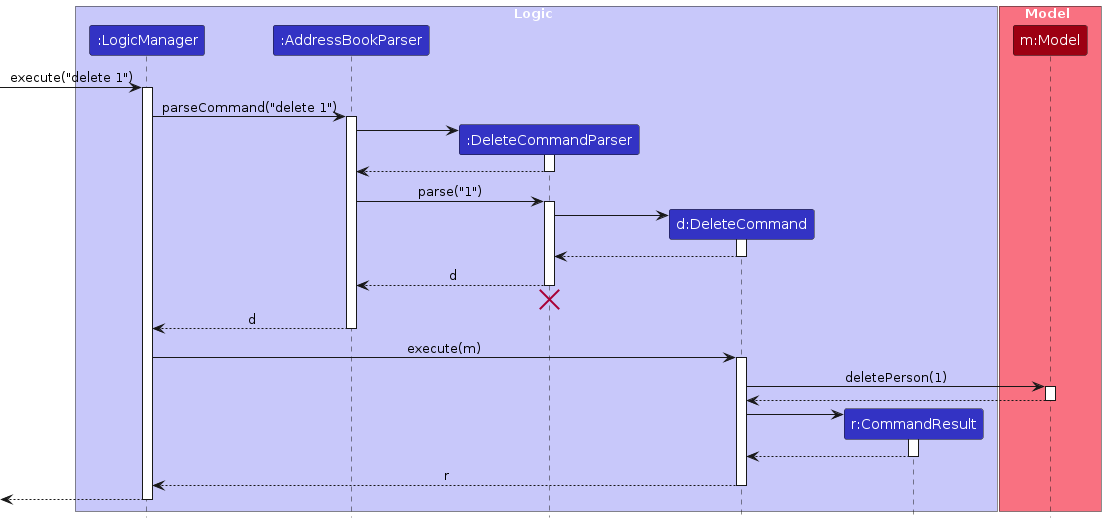
Note: The lifeline for DeleteTenantCommandParser should end at the destroy marker (X) but due to a limitation of
PlantUML, the lifeline continues till the end of diagram.
How the Logic component works:
- When
Logicis called upon to execute a command, it is passed to anEstateMateParserobject which in turn creates a parser that matches the command (e.g.,DeleteTenantCommandParserorAddJobCommandParser) and uses it to parse the command. - This results in a
Commandobject (more precisely, an object of one of its subclasses e.g.,DeleteTenantCommand) which is executed by theLogicManager. - The command can communicate with the
Modelwhen it is executed (e.g. to delete a tenant or add a job).
Note that although this is shown as a single step in the diagram above (for simplicity), in the code it can take several interactions (between the command object and theModel) to achieve. - The result of the command execution is encapsulated as a
CommandResultobject which is returned back fromLogic.
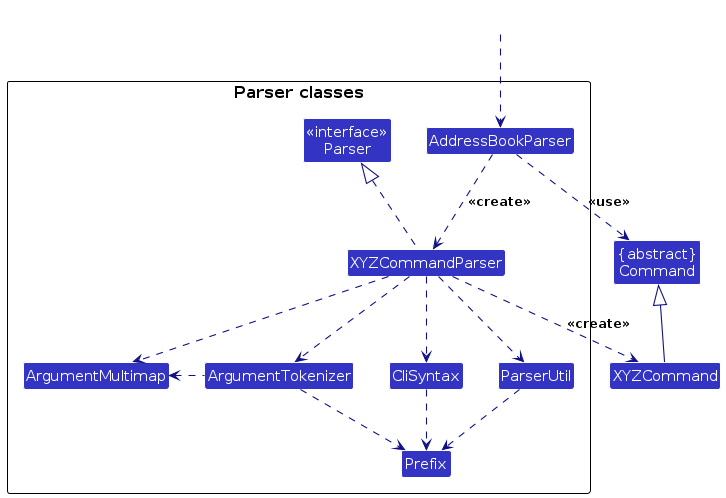
Here are the other classes in Logic (omitted from the class diagram above) that are used for parsing a user command:
How the parsing works:
- When called upon to parse a user command, the
EstateMateParserclass creates anXYZCommandParser(XYZis a placeholder for the specific command name e.g.,AddTenantCommandParser) which uses the other classes shown above to parse the user command and create aXYZCommandobject (e.g.,AddTenantCommand) which theEstateMateParserreturns back as aCommandobject. - All
XYZCommandParserclasses (e.g.,AddTenantCommandParser,DeleteTenantCommandParser, ...) inherit from theParserinterface so that they can be treated similarly where possible e.g, during testing.
Model component
API : Model.java
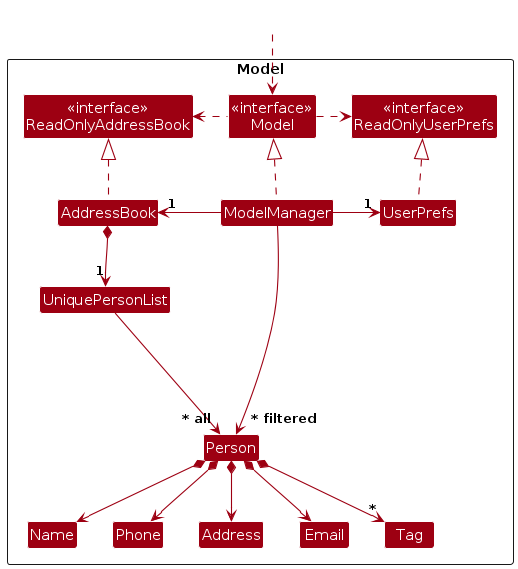
The Model component,
- stores the EstateMate data i.e., all
Personobjects (which are contained in aUniquePersonListobject). - stores the currently 'selected'
Personobjects (e.g., results of a search query) as a separate filtered list which is exposed to outsiders as an unmodifiableObservableList<Person>that can be 'observed' e.g. the UI can be bound to this list so that the UI automatically updates when the data in the list change. - stores a
UserPrefobject that represents the user’s preferences. This is exposed to the outside as aReadOnlyUserPrefobjects. - does not depend on any of the other three components (as the
Modelrepresents data entities of the domain, they should make sense on their own without depending on other components)
Storage component
API : Storage.java
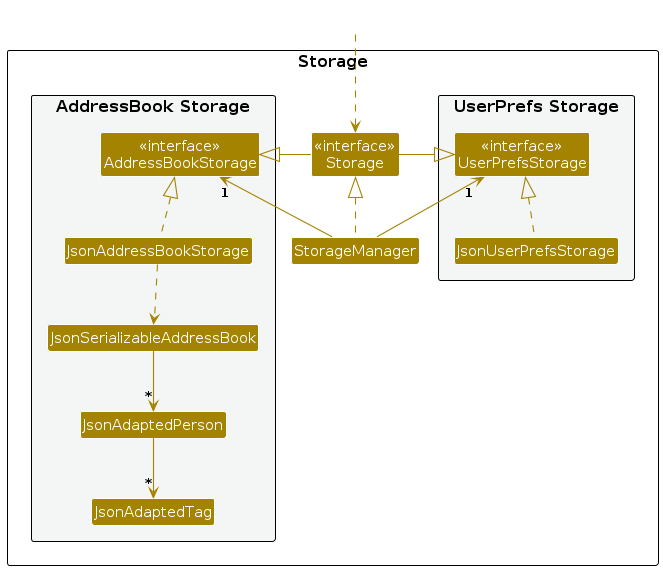
The Storage component,
- can save both EstateMate data and user preference data in JSON format, and read them back into corresponding objects.
- inherits from both
EstateMateStorageandUserPrefStorage, which means it can be treated as either one (if only the functionality of only one is needed). - depends on some classes in the
Modelcomponent (because theStoragecomponent's job is to save/retrieve objects that belong to theModel)
Common classes
Classes used by multiple components are in the seedu.estatemate.commons package.
Implementation
This section describes some noteworthy details on how certain features are implemented.
Job feature
Implementation Overview
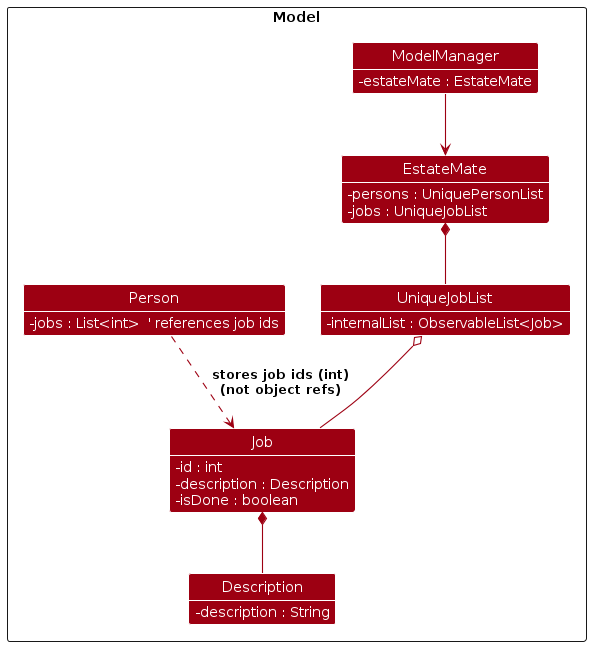
This section explains how Jobs are modelled, parsed, stored, and presented.
Model
Core Types
Jobfields:id:int,description:Description,isDone:boolean.Descriptionvalidates non-blank descriptions.UniqueJobListmaintains all jobs; provides add/remove/mark/unmark and an unmodifiable observable view.
Tenant References
PersonkeepsList<Integer> jobs(job ids).- Deleting a job cascades: the job is removed and its id is stripped from all persons’
jobslists.
Logic
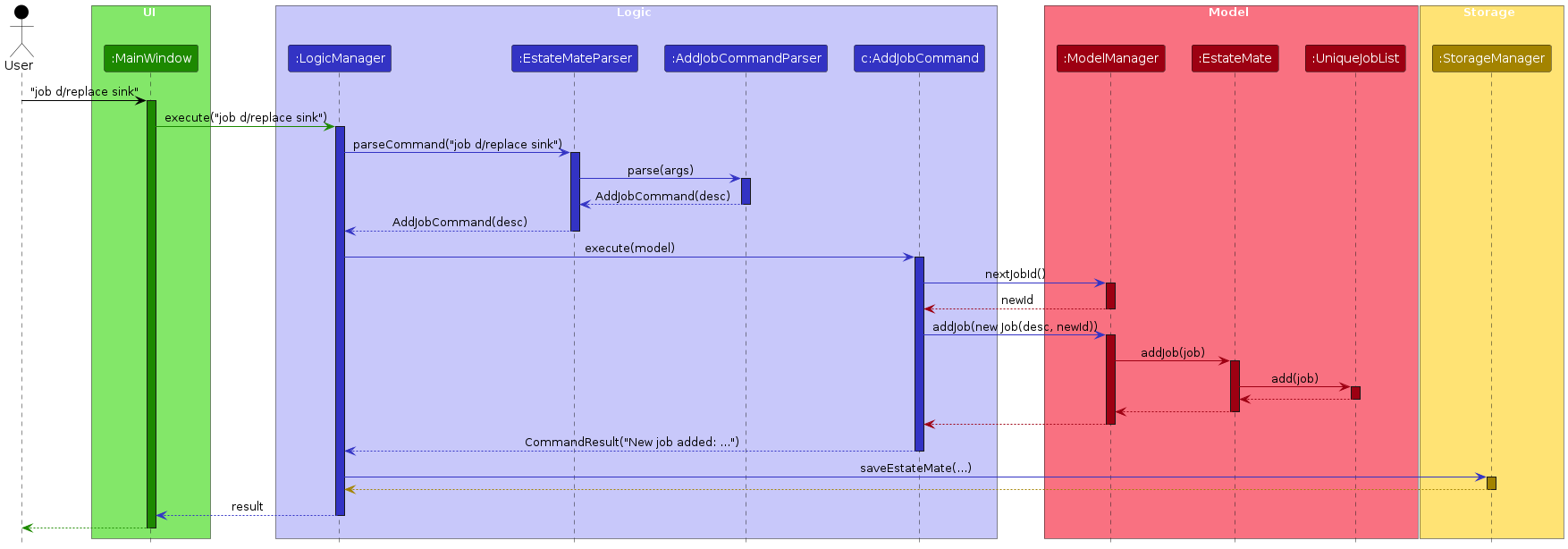
Commands
AddJobCommand(job d/<desc>) parsesDescription, allocates id viaModel#nextJobId(), adds job.EditJobCommand(ejob <id> d/<desc>) updates job description for the given id; preservesisDone.DeleteJobCommand(djob <id>) removes job and triggers cascade unlink from tenants.MarkJobCommand/UnmarkJobCommand(mark <id>/unmark <id>) toggles completion.FindJobCommand(fjob KEYWORDS…) filters by case-insensitive keywords withJobContainsKeywordsPredicate.
Parsers
AddJobCommandParser,EditJobCommandParser,DeleteJobCommandParser,MarkJobCommandParser,UnmarkJobCommandParser,FindJobCommandParsertokenize arguments, validate fields, and construct commands.
Post-mutation behaviour
- After job-list-changing mutations (job / ejob / djob),
ModelManagerresets the job filter toPREDICATE_SHOW_ALL_JOBS. Mark/unmark just update the job’s status and keep the current filter.
Storage
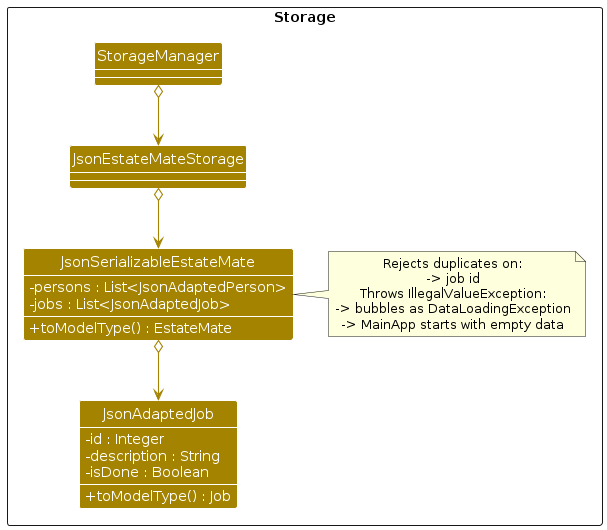
JSON Mapping
JsonAdaptedJob<->Jobwith fields
{ "id": number (>0), "description": string, "isDone": boolean }.JsonSerializableEstateMaterejects duplicates by id. Jobs with the same description are allowed and will all be loaded. Load errors surface asDataLoadingException; the app then starts with an empty dataset (AB-3 fallback path).
Save Flow
- After a successful command,
LogicManagerpersists viaStorageManager#saveEstateMate(...).
UI
Lists & Cards
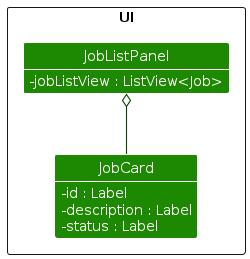
JobListPanelrenders theObservableList<Job>.- Each
JobCardshowsid,description, and a completion badge derived fromisDone. - The list updates automatically when
ModelManager'sfilteredJobschanges.
Design Notes
- Safe startup: duplicate jobs in storage (by id) cause load to fail; the app falls back to empty data.
- Consistency: job deletion removes any references from tenants (by id) to keep the model coherent.
Documentation, logging, testing, configuration, dev-ops
Appendix: Requirements
Product scope
Target user profile:
- Property managers and property management companies managing multiple rental units.
- Needs to track and update tenant details efficiently (contact info, lease, rent, maintenance jobs).
- Needs a reliable system to manage both tenants and property maintenance.
- Prefers a fast, keyboard-driven desktop application.
- Comfortable with structured data entry and managing records through commands.
Value proposition: EstateMate helps property managers stay organized and in control of their operations. It provides a centralized and efficient way to manage tenants, rental records, and maintenance jobs all from a simple, keyboard-friendly interface. With EstateMate, users can:
- Maintain accurate and organised tenant records
- Monitor rental payments and lease durations
- Track maintenance jobs and their completion status
- Improve operational efficiency through a command-driven interface
User Stories
Priorities: High (must have) - * * *, Medium (nice to have) - * *, Low (unlikely to have) - *
| Priority | As a ... | I want to ... | So that I can... |
|---|---|---|---|
| '***' | Property Manager | Add new tenants and their information | manage tenants for contacting and tracking their information |
| '***' | Property Manager | Delete tenants and their information | remove people who are no longer tenants |
| '***' | Property Manager | List all tenants | see what tenants I am keeping track of |
| '***' | Property Manager | Add new maintenance jobs | keep track of tasks that need to be carried out |
| '***' | Property Manager | Delete maintenance jobs | remove tasks that are no longer needed |
| '***' | Property Manager | List all jobs | see what jobs I am keeping track of |
| '***' | Property Manager | Mark jobs as completed | monitor the progress and ensure maintenance tasks are resolved |
| '***' | Property Manager | Unmark jobs as not completed | keep track of tasks that still need to be followed up on |
| '***' | Property Manager | View available commands | refer to usage instructions when needed to avoid mistakes |
| '***' | Property Manager | Exit the application | safely close the system and ensure all changes are saved |
| --- | --- | --- | --- |
| '**' | Property Manager | Search a tenant | quickly locate a tenant without scrolling through the entire tenant list |
| '**' | Property Manager | Search a maintenance job | quickly locate a maintenance job without scrolling through the entire job list |
| '**' | Property Manager | Edit tenant details | update their information when changes occur |
| '**' | Property Manager | Edit maintenance jobs | update maintenance job description when changes occur |
| '**' | Property Manager | Link jobs to specific tenants | know which tenant is associated with each maintenance request |
| '**' | Property Manager | Clear all tenants from the system | reset the tenant database or start fresh |
Use Cases
(For all use cases below, the System is the 'TenantManager' and the Actor is the 'user', unless specified otherwise)
Use case: UC01 - Add a tenant
MSS
- User requests to add a tenant with all required information.
- System checks for correct parameter format and completeness.
- System verifies that a tenant with the same name does not already exist.
- System creates a new tenant record.
- System shows the success message and refreshes the tenants list automatically.
Use case ends.
Extensions
- 2a. The command format is wrong (e.g., missing parameter, wrong date format).
- 2a1. System shows an error message and provides the correct input format.
Use case ends.
- 2a1. System shows an error message and provides the correct input format.
- 3a. A tenant with the same name already exists.
- 3a1. System shows an error message indicating that the tenant already exists.
Use case ends.
- 3a1. System shows an error message indicating that the tenant already exists.
Use case: UC02 - Delete a tenant
MSS
- User requests to delete a specific tenant.
- System verifies that the request is valid and corresponds to an existing tenant.
- System removes the specified tenant.
- System shows the success message and refreshes the list of tenants automatically.
Use case ends.
Extensions
- 2a. The given tenant number is invalid.
- 2a1. System shows an error message that the provided tenant number is invalid and provides
the correct input format.
Use case ends.
- 2a1. System shows an error message that the provided tenant number is invalid and provides
the correct input format.
- 2b. The given tenant number does not correspond to any existing tenant.
- 2b1. System shows an error message indicating that the tenant does not exist.
Use case ends.
- 2b1. System shows an error message indicating that the tenant does not exist.
Use case: UC03 - List all tenants
MSS
- User requests to view all tenant information.
- System displays the full list of tenants, including all details for each tenant.
Use case ends.
Extensions
- 1a. The command format is wrong (e.g., wrong spelling).
- 1a1. System shows an error message indicating that the command format is invalid.
Use case ends.
- 1a1. System shows an error message indicating that the command format is invalid.
Use case: UC04 - Add a maintenance job
MSS
- User requests to add a maintenance job, with provided job description.
- System verifies that description is provided and not empty.
- System creates a new maintenance job and sets default status in the job list.
- System shows the success message and refreshes the job list display to include the newly added job.
Use case ends.
Extensions
- 2a. The given job description is missing or empty.
- 2a1. System shows an error message indicating that the description cannot be empty.
Use case ends.
- 2a1. System shows an error message indicating that the description cannot be empty.
Use case: UC05 - Delete a maintenance job
MSS
- User requests to delete a maintenance job.
- System verifies that the request is valid and corresponds to an existing job.
- System deletes the specified maintenance job.
- System shows the success message and refreshes the job list to reflect the removal.
Use case ends.
Extensions
- 2a. The given input is invalid (e.g., empty, not positive integer).
- 2a1. System shows an error message that the provided input is invalid and provides
the correct input format.
Use case ends.
- 2a1. System shows an error message that the provided input is invalid and provides
the correct input format.
- 2b. The given input does not correspond to any existing job.
- 2b1. System shows an error message indicating that the job does not exist.
Use case ends.
- 2b1. System shows an error message indicating that the job does not exist.
Use case: UC06 - List all maintenance jobs
MSS
- User requests to view all maintenance jobs.
- System displays the full list of maintenance jobs, including the completion status of each job.
Use case ends.
Extensions
- 1a. The command format is wrong (e.g., wrong spelling).
- 1a1. System shows an error message indicating that the command format is invalid.
Use case ends.
- 1a1. System shows an error message indicating that the command format is invalid.
Use case: UC07 - Mark maintenance job
MSS
- User requests to mark a maintenance job as completed.
- System verifies that the request is valid and corresponds to an existing unmarked job.
- System sets the status of the maintenance job.
- System shows the success message and refreshes the maintenance job list display to reflect the new status.
Use case ends.
Extensions
- 2a. The given input is invalid (e.g., empty, not positive integer).
- 2a1. System shows an error message that the provided input is invalid and provides
the correct input format.
Use case ends.
- 2a1. System shows an error message that the provided input is invalid and provides
the correct input format.
- 2b. The given input does not correspond to any existing job in the job list
- 2b1. System shows an error message indicating that the job does not exist.
Use case ends.
- 2b1. System shows an error message indicating that the job does not exist.
- 2c. The job is already marked as completed.
- 2c1. System shows a message indicating that the job is already completed.
Use case ends.
- 2c1. System shows a message indicating that the job is already completed.
Use case: UC08 - Unmark maintenance job
MSS
- User requests to revert a maintenance job as not completed.
- System verifies that the request is valid and corresponds to an existing marked job.
- System sets the status of the maintenance job accordingly in the job list in any linked tenant's job list.
- System shows the success message and refreshes the maintenance job list display to reflect the new status.
Use case ends.
Extensions
- 2a. The given input is invalid (e.g., empty, not positive integer).
- 2a1. System shows an error message that the provided input is invalid and provides
the correct input format.
Use case ends.
- 2a1. System shows an error message that the provided input is invalid and provides
the correct input format.
- 2b. The given input does not correspond to any existing job in the job list.
- 2b1. System shows an error message indicating that the job does not exist.
Use case ends.
- 2b1. System shows an error message indicating that the job does not exist.
- 2c. The job is already marked as not completed.
- 2c1. System shows a message indicating that the job is already in pending state.
Use case ends.
- 2c1. System shows a message indicating that the job is already in pending state.
Use case: UC09 - Help command
MSS
- User requests a list of all available commands.
- System directs user to the user guide.
Use case ends.
Extensions
- 1a. The command format is wrong (e.g., wrong spelling).
- 1a1. System shows an error message indicating that the command format is invalid.
Use case ends.
- 1a1. System shows an error message indicating that the command format is invalid.
Use case: UC10 - Find a tenant
MSS
- User requests to find a specific tenant.
- System verifies the entered keyword(s).
- System retrieves all matching tenant records.
- System automatically displays the list of matching tenants along with their keywords.
Use case ends.
Extensions
- 2a. The given keyword(s) is invalid (e.g., empty).
- 2a1. System shows an error message indicating that the provided keyword(s) is invalid.
Use case ends.
- 2a1. System shows an error message indicating that the provided keyword(s) is invalid.
- 3a. No tenants match the search keyword.
- 3a1. System shows a message indicating that no matching tenants were found.
Use case ends.
- 3a1. System shows a message indicating that no matching tenants were found.
Use case: UC11 - Find a maintenance job
MSS
- User requests to find a maintenance job.
- System verifies the given keyword(s).
- System retrieves all matching job records.
- System automatically displays the list of matching jobs.
Extensions
- 2a. The given keyword(s) is invalid (e.g., empty).
- 2a1. System shows an error message indicating that the provided keyword(s) is invalid.
Use case ends.
- 2a1. System shows an error message indicating that the provided keyword(s) is invalid.
- 3a. No job matches the search keyword(s).
- 3a1. System shows a message indicating that no matching jobs were found.
Use case ends.
- 3a1. System shows a message indicating that no matching jobs were found.
Use case: UC12 - Edit a tenant
MSS
- User requests to edit a tenant with one or more updated fields.
- System verifies that the request is valid and corresponds to an existing tenant.
- System updates only the specified fields of the tenant's record while keeping other details unchanged.
- System shows the success message and refreshes the tenant list display to reflect the changes.
Use case ends.
Extensions
- 2a. The given input is invalid (e.g., empty, not positive integer).
- 2a1. System shows an error message that the provided input is invalid and provides
the correct input format.
Use case ends.
- 2a1. System shows an error message that the provided input is invalid and provides
the correct input format.
- 2b. The given input does not correspond to any existing tenant in the list.
- 2b1. System shows an error message indicating that the tenant does not exist.
Use case ends.
- 2b1. System shows an error message indicating that the tenant does not exist.
- 2c. The command does not include any field to edit.
- 2c1. System shows an error message indicating that at least one field must be specified.
Use case ends.
- 2c1. System shows an error message indicating that at least one field must be specified.
Use case: UC13 - Edit a maintenance job
MSS
- User requests to edit a maintenance job with updated description.
- System verifies that the request is valid and corresponds to an existing job.
- System updates only the maintenance job description.
- System shows the success message and refreshes the job list display to reflect the changes.
Use case ends.
Extensions
- 2a. The given input is invalid (e.g., empty, not positive integer).
- 2a1. System shows an error message that the provided input is invalid and provides
the correct input format.
Use case ends.
- 2a1. System shows an error message that the provided input is invalid and provides
the correct input format.
- 2b. The given input does not correspond to any existing job in the list.
- 2b1. System shows an error message indicating that the job does not exist.
Use case ends.
- 2b1. System shows an error message indicating that the job does not exist.
- 2c. The command does not include any description to edit.
- 2c1. System shows an error message indicating that description cannot be empty.
Use case ends.
- 2c1. System shows an error message indicating that description cannot be empty.
Use case: UC14 - Link maintenance job to tenant
MSS
- User requests to link an existing maintenance job to a tenant.
- System verifies that the request is valid, corresponds to an existing tenant and maintenance job.
- System links the specified job to the tenant updating the tenant's assigned job list and maintaining the job status.
- System shows a success message and refreshes the UI to reflect the linked job under the tenant's assigned jobs.
Use case ends.
Extensions
- 2a. The given input is invalid (e.g., empty fields, not positive integer).
- 2a1. System shows an error message that the provided input is invalid and
provides the correct input format.
Use case ends.
- 2a1. System shows an error message that the provided input is invalid and
provides the correct input format.
- 2b. The given tenant number does not correspond to any existing tenant.
- 2b1. System shows an error message indicating that the tenant does not exist.
Use case ends.
- 2b1. System shows an error message indicating that the tenant does not exist.
- 2c. The given input does not correspond to any existing job.
- 2c1. System shows an error message indicating that the job does not exist.
Use case ends.
- 2c1. System shows an error message indicating that the job does not exist.
- 2d. The job is already linked to tenant.
- 2d1. System shows a message indicating that the job is already assigned to the tenant.
Use case ends.
- 2d1. System shows a message indicating that the job is already assigned to the tenant.
Use case: UC15 - Clear
MSS
- User removes all tenant contacts in the database.
- EstateMate clears the database and updates local JSON file.
Use case ends.
Use case: UC16 - Exit
MSS
- User wants to exit the application.
- EstateMate is terminated.
Use case ends.
Non-Functional Requirements
Performance
- Should work on any mainstream OS as long as it has Java
17or above installed. - Should be packaged from a single JAR file.
- Should not take up more than 100MB in file size.
- Should be able to hold up to 1000 contacts without a noticeable sluggishness in performance for typical usage.
Note: within 1 second for typical operations like listing, searching, adding, etc.
- Users with above-average typing speed should be able to perform most tasks faster via commands than using a mouse.
- Should work without requiring an installer.
- Should work well for standard screen resolutions and be usable for resolutions 1280x720, screen scales 150%.
Note: Standard screen resolutions - 1920x1080 and higher, screen scales 100% and 125%.
Usability
- The system should provide clear, informative error messages to guide user for invalid inputs.
- Commands and outputs should follow a consistent format to minimize confusion.
- The data should be stored locally and be in a human editable text file.
Reliability
- Data should not be lost in case of sudden termination.
- The system should handle invalid inputs without crashing or corrupting.
Glossary
- Mainstream OS: Windows, Linux, Unix, MacOS
Appendix: Instructions for manual testing
Given below are instructions to test the app manually.
Note: These instructions only provide a starting point for testers to work on; testers are expected to do more exploratory testing.
Launch and shutdown
Initial launch
Download the jar file
estatemate.jarand copy into an empty foldercdto the folder with the jar file and running the commandjava -jar estatemate.jarto launch the app
Expected: Shows the GUI with a set of sample contacts. The window size may not be optimal.
Saving window preferences
Resize the window to an optimum size. Move the window to a different location. Close the window.
Re-launch the app by double-clicking the jar file.
Expected: The most recent window size and location is retained.
Proper shutdown
Open the help window by entering
helpinto the command box or using the button at the top left,Close the main application window.
Expected: Both the help window and the main window should close.
Deleting a tenant
Deleting a tenant while all tenants are being shown
Prerequisites: List all tenants using the
listcommand. Multiple tenants in the list.Test case:
delete 1
Expected: First tenant is deleted from the list. Details of the deleted tenant shown in the status message.Test case:
delete 0
Expected: No person is deleted. Error details shown in the status message. Tenant list remains the same.Other incorrect delete commands to try:
delete,delete x,...(where x is larger than the list size)
Expected: Similar to previous.
Adding a job
- Adding a new job
Prerequisites: No specific prerequisites.
Test case:
job d/ Pest infestation
Expected: Job is added to the job list. Details of the job are shown in the status message. Switch to a job list screen where the added job can be seen
Finding tenants
- Finding tenants by name
Prerequisites: At least one tenant with name containing the word
Alex, and no tenant with name containing the wordMichael.Test case:
find alex
Expected: Only tenants with names containing the wordAlex(non-case sensitive) are displayed.Test case:
find michael
Expected: An empty tenant list is displayed.
Finding jobs
- Finding jobs by description
Prerequisites: At least one job with name containing the word
pest, and no job with name containing the wordpipe.Test case:
fjob pest
Expected: Only jobs with descriptions containing the wordpest(non-case sensitive) are displayed.Test case:
fjob pipe
Expected: An empty job list is displayed.
Linking jobs to a tenant
Linking an existing tenant and job to each other
Prerequisites: List all tenants using the
listcommand. At least one tenant in the list. List all jobs using theljobcommand. At least one job (job id: 1) in the list.Test case:
link 1 j/1Expected: Job is linked to the tenant. Status message shows the job number and name of tenant linked. Job is displayed in the tenant's maintenance information section.
Linking a nonexistent tenant and a job to each other.
Prerequisites: List all tenants using the
listcommand. At most 4 tenants in the list. List all jobs using theljobcommand. At least one job (job id: 1) in the list.Test case:
link 5 j/1Expected: Job is not linked to the tenant. Error details shown in status message indicating invalid tenant index.
Linking a tenant and a nonexisting job to each other.
Prerequisites: List all tenants using the
listcommand. at least 1 tenant in the list. List all jobs using theljobcommand. At most 3 (max job id: 3) in the list.Test case:
link 1 j/4Expected: Job is not linked to the tenant. Error details showing in status message indicating invalid job index.
Appendix: Planned Enhancements
Team Size: 5
- Implement split screen display. (Allow both job lists and tenant lists to be displayed at the same time)
- Allow tenant names to support special/non-ASCII characters. (Not just alphanumeric characters and spaces)
- Allow for valid names like
Anne-marie,O'Brien,José.
- Allow for valid names like
- Improve tenant duplicate detection to include consideration for phone numbers.
- Allows same name, as long as the phone number is different.
helpcommand to show a quick, brief reference to available commands without the need to access external links.- Enhance
findcommand to no longer require full words to match.- e.g.
find Alewill display the tenantAlex Yeoh.
- e.g.
- Enhance
fjobcommand to no longer require full words to match.- e.g.
fjob leakwill display the job with descriptionPipe leakage.
- e.g.
- Add a command to unlink a job from a tenant. (Reverse of existing
linkcommand) - Perform more refined parsing validation for the
tenantcommand, specifically involving thea/tag.- Currently, an address field of
a/ a/is not accepted, while one ofa/a/is accepted.
- Currently, an address field of
- Perform more rigorous validation of special character positions in phone numbers in the
tenantcommand- e.g. Phone numbers like
999(())9999or99-----9should be rejected.
- e.g. Phone numbers like
- Add an extra layer of user verification to the
clearcommand.- e.g. Require user to input 'Y' in response to a verification question before clearing the data.
Appendix: Effort
The effort required and difficulty level was high, as we generally did not reuse any code (except for 1 method adapted
from StackOverflow).
While AB3 deals with only one entity type (Persons), EstateMate needs to handle two (Tenants and Jobs). The tenant class
is also much more detailed with more fields compared to the Person class from AB3.
Project Achievements
- Adding jobs and their related functionality
Challenges:- Finding a way to implement the storage for job data without interfering with the existing data storage for tenants.
- Switching to non-index based commands for jobs as having both index based commands for tenants and jobs could cause issues.
- Creating a whole new GUI section and components for displaying of jobs separately from tenants.
- Adding additional fields to the existing
addcommand to allow for adding tenants
Challenges:- Performing date parsing and verification, as Tenant has fields requiring dates while Person from AB3 does not. There are many edge cases to consider and thus this aspect is error-prone.
- Adding job-related methods and fields to the model for tenants while maintaining high cohesion simultaneously.
- Adding a new GUI screen to accommodate the addition of jobs
Challenges:- Starting from scratch as AB3 only has one screen to manage, while we have two.
- Managing the switching between screens based on commands, which we also needed to implement from scratch.